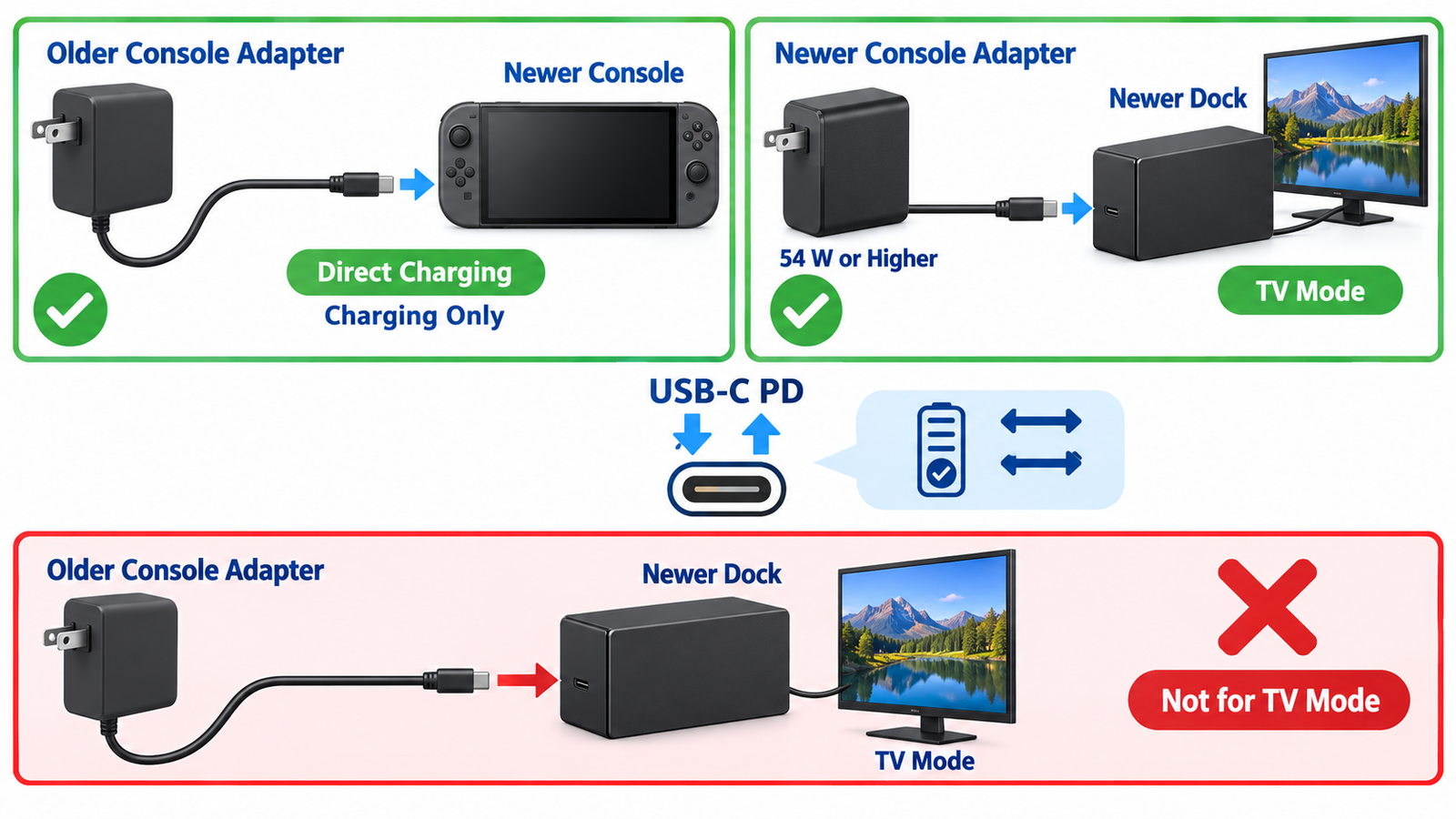
Yes, you can use the original Nintendo Switch AC adapter with a Nintendo Switch 2 for direct charging, but you cannot use that older adapter to power Switch 2 TV mode through the Switch 2 dock. Nintendo’s official support guidance distinguishes between charging the console itself and supplying enough power for docked operation.
The practical rule is simple: connect the older HAC-002 adapter directly to the USB-C port on the Switch 2 when you only need charging. Use the Switch 2 NGN-01 adapter, or another compatible high-power USB-C Power Delivery supply, with the Switch 2 dock and TV mode.
What Nintendo officially supports
Nintendo states that the Switch 2 console is compatible with both the Switch 2 AC adapter model NGN-01 and the original Switch AC adapter model HAC-002 when the adapter is connected directly to the console. The company also states that the older Switch adapter cannot power the Switch 2 console in TV mode because of the difference in output.
Regional Nintendo support pages further indicate that a commercially available compatible adapter with 54 W or higher output may be used regardless of play mode. Nintendo also warns that it has not tested every third-party adapter and cannot guarantee stable operation or safety. Always follow the requirements printed for your regional console and adapter.
Why direct charging works but TV mode does not
USB-C Power Delivery lets the console and adapter negotiate a supported voltage and current. When the Switch 2 is connected directly to the older official adapter, it can accept an available power profile and charge, although charge speed or available power during heavy gameplay may be lower than with the newer adapter.
Docked TV mode has a larger power budget. The system must run the console, supply the dock electronics and USB devices, and maintain stable video output while charging. The older adapter does not offer enough supported output for the Switch 2 dock’s TV-mode requirement, so physical connector compatibility does not equal full operating compatibility.
This distinction is common in modern switching power supplies: two USB-C sources can fit the same port yet expose different negotiated power profiles.
Safe ways to charge a Switch 2
- Best all-purpose option: use the included Switch 2 AC adapter and its intended cable.
- Older official adapter: connect the original Switch AC adapter directly to the top or bottom USB-C port on the Switch 2 for charging only.
- Third-party USB-C PD adapter: choose a reputable, region-approved unit that meets the console’s power requirements; Nintendo’s support guidance specifies 54 W or higher for use regardless of play mode.
- Portable battery: use a USB-C PD power bank and cable that advertise a compatible output profile and have enough energy and thermal capacity for the intended session.
Can the old adapter damage Switch 2?
The official original Switch adapter is explicitly supported for direct charging, so using it that way should not damage a normal Switch 2. The console and adapter negotiate power rather than forcing maximum current through the port. Problems are more likely with counterfeit, damaged, poorly designed, or noncompliant accessories.
Stop using any adapter or cable that becomes abnormally hot, smells unusual, has a loose connector, shows damaged insulation, or repeatedly disconnects. Plug the adapter directly into a sound wall outlet during troubleshooting and allow both console and adapter to cool before retesting.
What about the original Switch dock?
The original Nintendo Switch dock is not the Switch 2 dock and should not be treated as interchangeable merely because both ecosystems use USB-C. Mechanical fit, video output, power negotiation, cooling, and system communication differ. Use the dock designed for the console generation.
Similarly, do not improvise by connecting the old adapter to the new dock and assuming that a separate display cable will solve the power deficit. Nintendo specifically limits the older adapter to charging and excludes TV mode.
How to choose a third-party charger
- Confirm USB-C Power Delivery support, not only a high wattage printed on the enclosure.
- Verify that the required output is available from one port; multi-port chargers often reduce per-port output when several devices are connected.
- Use a cable rated for the required current and power.
- Prefer recognized safety approvals for your country and a manufacturer that publishes complete output profiles.
- Allow ventilation and avoid covering the charger during use.
- Check Nintendo’s current support page because compatibility guidance can change with hardware revisions.
A quality charger is itself a regulated converter. The overview of rectifier diodes in power conversion explains one of the component families used to turn AC input into regulated DC, while Schottky diode selection covers fast low-voltage rectification used in many power circuits.
Troubleshooting slow or failed charging
- Disconnect the adapter from the console and wall outlet, wait about 20 seconds, and reconnect it.
- Try the official Switch 2 adapter to determine whether the older adapter or cable is the limiting factor.
- Connect directly to the console rather than through the dock, hub, extension, or display.
- Inspect both USB-C ports for lint, liquid, bent contacts, or looseness without inserting metal tools.
- Shut the console down completely and test charging while it is off.
- Check the battery icon and allow several minutes if the battery is deeply discharged.
- If the problem persists with the official equipment, contact Nintendo support or an authorized service center.
Do not open a mains adapter. Its primary-side capacitors can retain hazardous voltage, and correct isolation is essential. For general converter behavior, review how switch-mode power conversion works.
Frequently asked questions
Will the Switch 1 charger charge Switch 2 while I play?
It can charge when connected directly, but the battery may charge more slowly under a heavy game load because less power is available than from the Switch 2 adapter.
Can I use the Switch 1 charger in the Switch 2 dock?
Not for TV mode. Nintendo says the older adapter cannot power the Switch 2 console in TV mode.
Is every 60 W USB-C charger compatible?
No. Wattage alone is not enough. The charger and cable must support suitable USB-C PD profiles, meet safety requirements, and provide the rated output on the port being used.
Should I buy another official adapter?
If you want predictable docked and handheld behavior, the official Switch 2 adapter is the simplest choice. A compliant third-party adapter can be convenient, but verify its specifications and regional approval.