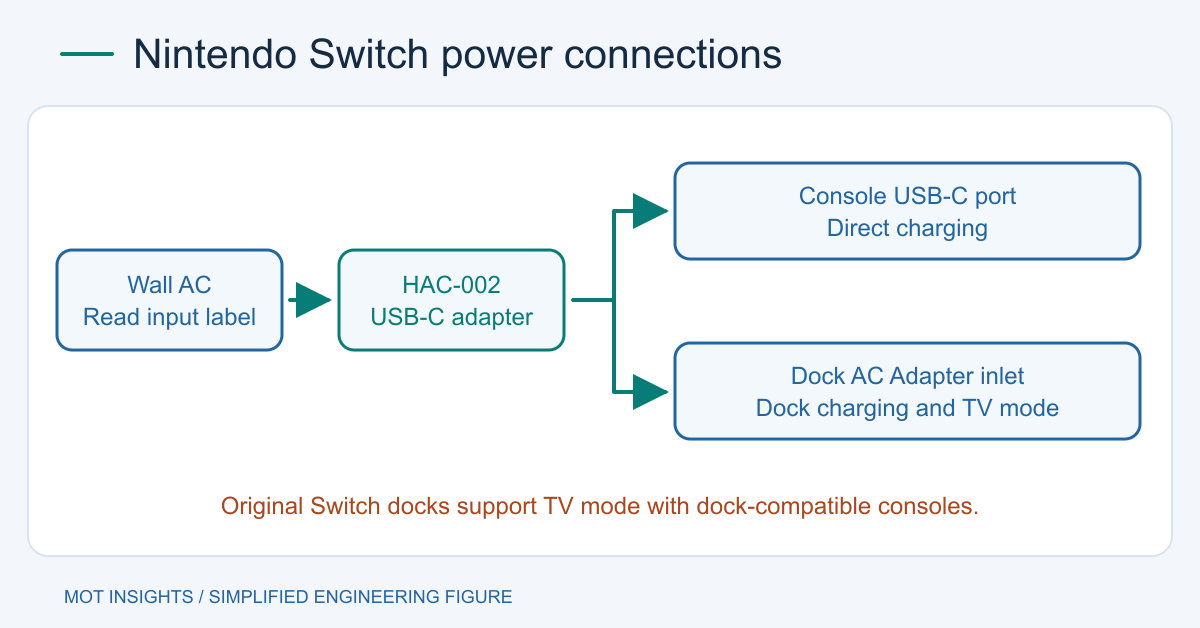
The original Nintendo Switch family uses a USB-C power connection, and Nintendo specifies the HAC-002 AC adapter for direct charging and for TV mode through compatible original Switch docks. Nintendo documents AC 100–240 V, 50/60 Hz input for the UK HAC-002 variant. Check the label on your own adapter when traveling, and identify the console generation before choosing the dock or power supply.
Choose the power path for your console
For direct charging, connect the adapter’s USB-C plug to the console’s USB-C port. Nintendo describes this route for the original Switch, the OLED model and the Switch Lite. If you use a compatible original dock, connect the adapter to the rear port labeled AC Adapter before seating the console. The dock’s accessory USB ports have a separate role. Switch Lite uses direct charging and does not support TV mode.
| Equipment | Documented power connection | Use |
|---|---|---|
| Original Switch or Switch OLED | HAC-002 directly to console | Handheld charging |
| Original Switch or Switch OLED with compatible original dock | HAC-002 to dock’s AC Adapter inlet | Docked charging and TV mode |
| Switch Lite | HAC-002 directly to console | Handheld charging |
| Switch 2 with its own dock | Switch 2 power arrangement per Nintendo | Switch 2 TV mode |
For the last row, the original adapter can charge the Switch 2 directly according to Nintendo, while Switch 2 TV mode has different power requirements. The Switch 1-to-Switch 2 adapter compatibility guide covers that cross-generation case.
Read the output voltage and current together
Nintendo’s UK ecodesign information for HAC-002 lists two documented DC output points: 5.0 V at 1.5 A and 15.0 V at 2.6 A. These correspond to 7.5 W and 39 W at the stated outputs. Nintendo describes the adapter as automatically selecting output voltage according to the connected device. These figures describe what the adapter can supply under those conditions. Actual consumption varies with the device state.
A USB-C connector by itself gives you the physical interface. Power suitability still depends on the output the source can provide and the console or dock can use. A charger whose total wattage looks adequate may offer different voltage-current combinations or divide output among its ports. A measured charge icon on a handheld console confirms that particular charging condition. It does not establish reliable dock TV operation. Use the official adapter to establish a known baseline for troubleshooting.
This is a specific example of the distinction between a supply’s current rating and the current the attached load draws. The same principle applies to other regulated switching supply loads even when their connectors and voltage selection differ.
Check dual-voltage operation before travel
Read the input line on your adapter and compare it with the local AC voltage and frequency. For the documented UK HAC-002, AC 100–240 V at 50/60 Hz covers nominal 120 V and 230 V services within its specified range. The shape of the wall plug is a separate matter. Use a suitable travel plug adapter where needed. A plug adapter changes the physical connection and does not convert voltage. Labels on regional variants and replacement adapters should be checked individually.
The 5 V and 15 V markings are DC output modes. They do not set or indicate the wall voltage. A manual 115/230 V selector on some unrelated power supplies illustrates a different design. See manual versus automatic AC input selection for how to interpret these markings on other equipment.
Isolate a dock problem from a charging problem
Start with the adapter directly connected to the console and a known working outlet. Then use the same official adapter on the dock’s correct inlet. Check that the dock and console match, that the console seats fully, and that the HDMI connection and display input are correct. Direct charging with no TV image in the dock warrants checking the dock and display path as well as power. A loose or damaged connector should be serviced according to Nintendo’s guidance. Avoid forcing the plug into the port.
If you only need handheld charging, verify the console behavior directly first. If you need TV mode, check the complete dock setup under that operating condition. For engineering questions about how adapters convert mains input into controlled DC rails, see the switching power supply overview.